Introduction
In modern hydroponic systems, accurate pH and electrical conductivity (EC) measurements are essential for optimal plant growth. This guide explains how to calibrate hydroponic sensors using a smartphone camera, providing a quick step-by-step process that yields reliable data. Readers will learn how to prepare calibration solutions, use dedicated mobile applications, and verify sensor performance without expensive laboratory equipment. By following the procedures, growers can reduce waste, improve nutrient uptake, and maintain stable water chemistry.
What You’ll Need
- Smartphone with a high-resolution camera and internet connectivity.
- Calibration solutions for pH (4.00 and 7.00) and EC/TDS (standard 1413 µS/cm solution).
- A continuous monitoring device such as the EZTOCH 7-in-1 pH Monitor or the LetPot EC & Temp Meter.
- A handheld meter like the VIVOSUN Digital pH TDS EC Meter for spot checks.
- Optional replacement probe such as the TEKCOPLUS pH Electrode Probe for long-term durability.
- Cleaning solution and a soft cloth.
Step-by-Step Instructions
1. Prepare Your Workspace
Begin by selecting a well-lit, flat surface where the sensor, calibration solutions, and smartphone can be arranged without interruption. Ensure that the area is free of dust and that all containers are clean to avoid cross-contamination. Place a disposable cup for each calibration solution and keep the manufacturer-provided cleaning solution within easy reach. This organized environment minimizes measurement errors and speeds up the calibration process.
2. Install a Calibration Application
Download a reputable calibration app that utilizes the smartphone camera to read colorimetric strips or liquid transparency. Applications such as “HydroSense” or “pH‑Cam” are designed to interpret the hue of calibration solutions and display precise values. After installation, grant the app permission to access the camera and storage, then perform a brief tutorial to familiarize yourself with the interface. The app will serve as a visual reference that complements the digital readout of your sensor.
3. Prepare Calibration Solutions
Open the pH calibration bottles that accompany the YINMIK 4-in-1 Hydroponic pH Meter and pour a small amount of the 4.00 pH solution into one cup and the 7.00 pH solution into another cup. For EC calibration, use the 1413 µS/cm solution included with the EZTOCH 7-in-1 pH Monitor. Label each cup clearly to avoid mixing, and keep the solutions at room temperature, as temperature fluctuations can affect the reference values. Accurate preparation of these standards is the foundation of a successful calibration.
4. Set Up the Continuous Monitor
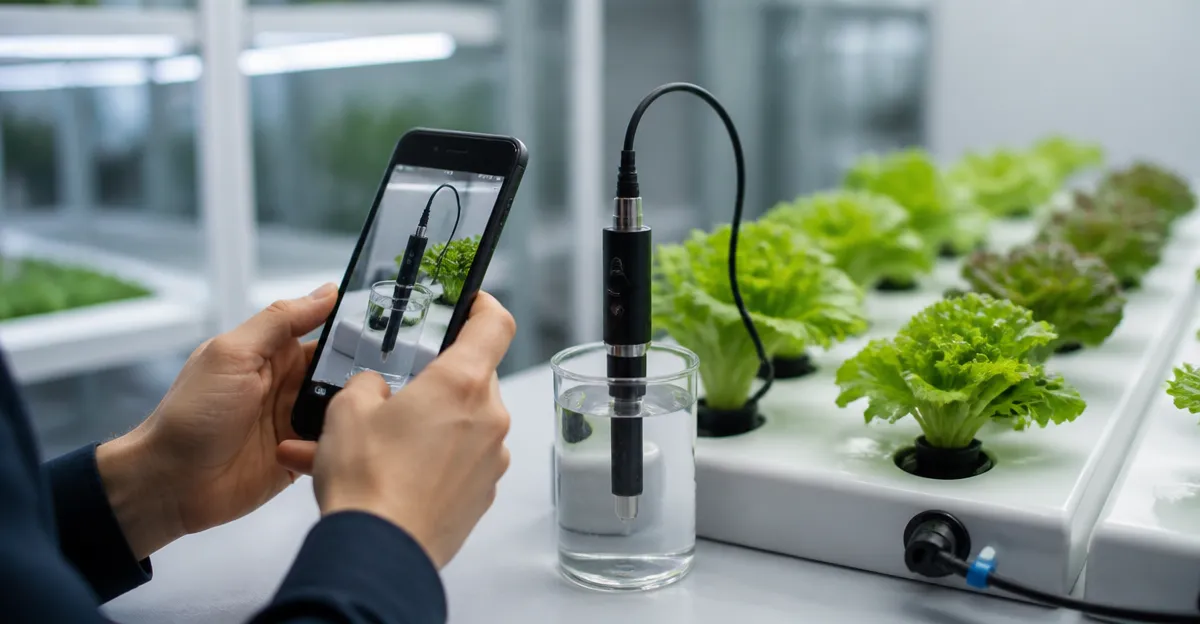
Unbox the EZTOCH 7-in-1 pH Monitor, which offers real-time pH, EC, TDS, ORP, CF, humidity, and temperature readings. Connect the device to a power source using the included AC adapter; the monitor does not rely on batteries, ensuring uninterrupted operation. Use the 1.2 meter probe cable to submerge the sensor fully in the calibration cup while the display unit remains dry and visible. Pair the monitor with the Tuya app, where you can view up to seven parameters simultaneously, set alert thresholds, and store historical data for future comparison.
5. Calibrate pH Using the Smartphone Camera
Place the 7.00 pH calibration solution in a clear container and position the smartphone camera directly above the liquid, ensuring that the entire surface is in focus. Activate the calibration app and capture an image; the software will analyze the color intensity and display a measured pH value. Compare this value with the monitor’s displayed pH reading. If the monitor deviates by more than 0.1 pH units, access the calibration menu on the monitor and follow the on-screen prompts to adjust the offset using the provided calibration solutions. Repeat the process with the 4.00 pH solution to confirm linearity across the measurement range. This dual-point calibration guarantees that the sensor provides accurate readings throughout the hydroponic cycle.
6. Calibrate EC/TDS with Visual Confirmation
Fill a separate cup with the 1413 µS/cm EC calibration solution and repeat the imaging procedure using the same app, which now switches to EC mode. The app will convert the visual data into an EC value expressed in µS/cm or mS/cm, depending on the selected unit. Verify that the monitor’s EC reading matches the app’s result within ±2 %. If a discrepancy exists, navigate to the EC calibration function on the monitor, enter the reference value, and store the new calibration constant. After calibration, the monitor will automatically apply temperature compensation (ATC) to deliver accurate TDS readings regardless of ambient temperature changes.
7. Verify Calibration with a Spot-Check Meter
Use the handheld VIVOSUN Digital pH TDS EC Meter to perform an independent verification. Dip the probe into the same calibration solutions and record the displayed pH and EC values. The VIVOSUN meter offers a measurement range of pH 0‑14 and EC up to 9990 µS/cm, providing a reliable cross-reference. If the handheld readings align with both the smartphone app and the continuous monitor, the calibration is confirmed. This redundancy reduces the risk of systematic error and builds confidence in long-term data collection.
8. Save Settings and Enable Smart Alerts
Return to the Tuya app linked with the EZTOCH 7-in-1 pH Monitor and store the calibrated parameters. Set high and low alert thresholds for pH (e.g., 5.5 – 6.5) and EC (e.g., 1.2 – 2.0 mS/cm) based on the specific crop requirements. Enable push notifications so that the smartphone alerts you instantly when values drift outside the optimal range. Continuous monitoring combined with real-time alerts minimizes nutrient imbalances and prevents costly plant stress.
9. Maintain Sensors for Ongoing Accuracy
Schedule a weekly cleaning routine using the probe cleaning solution supplied with the YINMIK 4-in-1 Hydroponic pH Meter. Rinse the probe with distilled water, dip it briefly in the cleaning solution, and store it in a protective case when not in use. Replace the probe after six months of continuous operation, or sooner if the sensor exhibits drift beyond the manufacturer’s specifications. For users who prefer a dedicated electrode, the TEKCOPLUS pH Electrode Probe offers a replaceable design that can be swapped without recalibrating the entire monitor.
Tips & Pro Tips
- Always calibrate at the temperature at which you will be measuring; temperature compensation can correct minor variations but extreme differences reduce accuracy.
- Store calibration solutions in opaque containers to prevent light‑induced degradation.
- Use the smartphone camera’s macro mode for sharper images of the calibration liquid, which improves the app’s analysis.
- Document each calibration event in a logbook or digital spreadsheet; historical trends help identify sensor aging.
- If the continuous monitor’s probe cable is longer than necessary, coil the excess neatly to avoid accidental tugging.
Troubleshooting
| Problem | Possible Cause | Solution |
|---|---|---|
| pH reading remains constant despite adjustments | Probe fouled or calibration solution expired | Clean the probe with the supplied cleaning solution and replace calibration fluids. |
| EC value fluctuates rapidly | Electrical noise from nearby equipment | Move the monitor away from high-current devices and use a shielded cable if available. |
| Smartphone app fails to recognize color | Poor lighting or camera focus | Increase ambient light, use a white background, and enable the camera’s focus lock. |
| Alert notifications not received | App permissions disabled | Enable push notifications in the phone’s settings and verify the Tuya app is logged in. |
Conclusion
Accurate calibration of hydroponic sensors using a smartphone camera empowers growers to maintain optimal pH and EC levels with confidence. By following the nine steps outlined above, users can prepare reliable calibration solutions, leverage mobile applications for visual verification, and integrate continuous monitoring devices such as the EZTOCH 7-in-1 pH Monitor into a smart alert system. Consistent maintenance and periodic verification with a handheld meter ensure long-term data integrity, ultimately leading to healthier plants and higher yields.
Products Mentioned in This Guide
Frequently Asked Questions
How can a smartphone camera be used to calibrate hydroponic pH and EC sensors?
By photographing the sensor’s display while immersed in known calibration solutions and using a calibration app to compare the reading with the solution’s reference value.
What calibration solutions are required for accurate pH and EC measurements?
Standard pH buffers at 4.00 and 7.00, and a 1413 µS/cm EC/TDS solution are recommended.
How often should hydroponic sensors be calibrated with a smartphone?
Calibrate at least once a month or whenever readings drift, after major nutrient changes, or when temperature shifts exceed 5 °C.
Do I need a specific mobile app to calibrate sensors, or will any camera work?
A dedicated calibration app that reads the sensor’s display and applies correction factors is needed; a regular camera alone cannot perform the calculation.
What common mistakes can affect smartphone‑based sensor calibration?
Using low‑resolution images, dirty sensor lenses, incorrect solution temperatures, or mismatched app settings can lead to inaccurate calibrations.